Introduction
WordPress stands at the forefront of website building in today’s digital landscape, powering a significant portion of the global online presence. As developers and site managers aim to streamline their processes, leveraging open-source resources has become indispensable. Among these resources, GPL tools emerge as a cornerstone for robust, cost-effective, and highly flexible WordPress development. Backed by the General Public License (GPL), these solutions enable you to run, study, share, and modify software without the constraints of proprietary licenses.
This year (2026), the momentum behind open-source collaboration continues to accelerate. By tapping into GPL tools, you gain a suite of plugins, themes, libraries, and utilities designed to enhance performance, secure applications, and automate routine tasks. From refining user interfaces to tightening security protocols, these resources offer a transparent and collaborative framework that fuels innovation. Whether you manage a personal blog, an extensive e-commerce platform, or a corporate website, understanding how to select and implement GPL tools can radically improve your workflow.
In this guide, we will explore essential aspects of GPL tools: defining their nature, outlining key benefits, spotlighting top picks, and demonstrating best practices for integration and management. Along the way, we reference respected sources such as the Free Software Foundation (https://www.gnu.org/licenses/gpl-3.0.en.html) and guidance from leading security agencies like CISA (https://www.cisa.gov). Let’s dive into how these open-source solutions can transform your WordPress development process into an efficient, scalable, and future-ready operation.
Understanding GPL tools and their importance
At the heart of every successful WordPress project is a careful selection of software components. GPL tools deliver a unique combination of transparency, collaboration, and freedom that traditional closed-source solutions cannot match. Licensed under the General Public License, these tools allow site administrators and developers to examine code line by line, adapt features to specific requirements, and redistribute improvements within the community. In essence, GPL ensures that your investment in custom development benefits not only your project but also the wider ecosystem of contributors.
One significant advantage of GPL tools is the peace of mind that comes with community-driven quality assurance. Active participation by developers worldwide means that bugs, vulnerabilities, and design inefficiencies surface quickly, leading to rapid fixes and patches. This collaborative model aligns with best practices recommended by research institutions such as the MIT Computer Science and Artificial Intelligence Laboratory (CSAIL) (https://www.csail.mit.edu), which highlights the value of open peer review in software development. As a result, your WordPress installations can remain stable and secure.
In addition to robust security, GPL tools excel in fostering modular architecture. By leveraging plugins and themes that adhere to this license, you can mix and match components without worrying about compatibility issues or licensing restrictions. This modularity simplifies upgrades and customization. Instead of being locked into a monolithic platform, you gain the ability to swap out elements or extend functionality using a consistent integration approach. Such flexibility is especially valuable when evolving a site to meet changing user demands.
Transparency also empowers teams to conduct thorough audits and performance profiling. With unrestricted access to source code, developers can identify bottlenecks, refine database queries, and optimize front-end assets. Tools licensed under GPL often include built-in debugging features or integrate seamlessly with specialized profilers. This depth of insight supports a proactive stance on performance tuning, ensuring that your site remains responsive and scalable under varying traffic levels.
In today’s digital landscape, where speed-to-market and continuous improvement are crucial, GPL tools offer a strategic advantage. Rather than waiting for vendor roadmaps or paying for premium licensing tiers, you can deploy updates immediately, patch vulnerabilities, and introduce new features on-demand. This agility aligns with DevOps practices and supports continuous delivery pipelines. By adopting GPL solutions, teams can pivot faster, experiment with new approaches, and maintain an edge over competitors who rely on slower, closed-source releases.
Given these attributes, it becomes clear why GPL tools have become foundational in modern WordPress development. They deliver freedom, foster innovation, and build a resilient ecosystem that benefits every stakeholder. In the next section, we will examine the specific benefits that result from adopting GPL solutions, highlighting cost, customization, and community support advantages that directly impact your bottom line and project efficiency.
Advantages of leveraging GPL tools for WordPress development
When evaluating software solutions, return on investment and speed of delivery rank near the top of any developer’s criteria list. GPL tools excel in both, beginning with cost efficiency. Since these resources are open-source, there are no licensing fees or subscription costs tied to usage. Organizations can allocate budgets to hosting, design, and custom development rather than unlocking basic functionality behind paywalls. Over multiple website deployments or large-scale projects, these savings accumulate significantly, letting teams reinvest in optimization or security measures.
Flexibility is another key benefit. With unrestricted access to source code, you can tailor each component to your precise needs. Whether adjusting a theme’s layout, extending plugin APIs, or reworking utility libraries, GPL tools permit deep modifications. This level of control empowers developers to address unique requirements without resorting to workaround hacks or third-party add-ons that might introduce vulnerabilities or bloat. The ability to refactor code in-house also accelerates bug fixes and feature rollouts.
Customization rooted in GPL licensing fosters a culture of innovation. Developers are free to experiment with emerging technologies, refactor existing modules, or integrate cutting-edge APIs. For instance, integrating headless CMS patterns or progressive web app functionality becomes more straightforward when you control the underlying codebase. This agility supports competitive differentiation, enabling your site to deliver richer experiences and adapt to new user expectations.
Security considerations also underscore the merits of GPL tools. Open review processes often result in vulnerabilities being identified and patched rapidly. The speed of community-driven responses often outpaces commercial software updates, reducing exposure windows. Moreover, security-focused teams can conduct in-depth audits, leveraging specialized frameworks from organizations like the United States Cybersecurity and Infrastructure Security Agency (CISA) to validate code integrity. Such collaboration ensures that security best practices are embedded directly into your workflow.
Beyond these technical advantages, GPL tools benefit from vibrant community support. Online forums, developer groups, and code repositories host lively discussions, plugin forks, and feature proposals. This ecosystem provides a wealth of tutorials, sample configurations, and troubleshooting guides that can shorten learning curves and accelerate development cycles. When questions arise, it is common to find detailed answers from seasoned contributors, reducing dependency on commercial support channels.
By combining cost efficiency, deep customization options, robust security, and active community engagement, GPL tools establish a solid foundation for WordPress development. These benefits translate into measurable improvements in time-to-market, operational expenses, and user satisfaction. In the following section, we will highlight some of the top GPL tools available today to help you further streamline your workflow.
Top GPL tools to elevate your WordPress projects
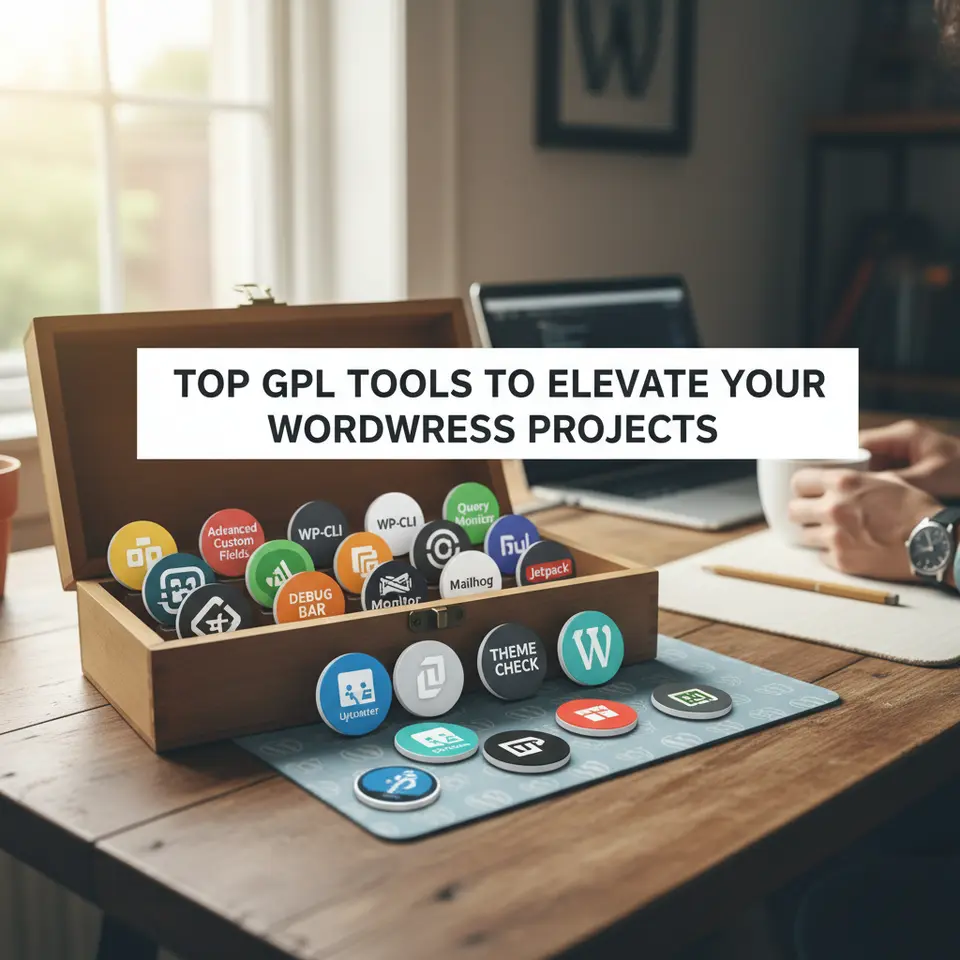
In a crowded ecosystem of plugins and utilities, selecting the most impactful GPL tools can streamline your workflow and enhance site performance. Below are eight standout options that have proven indispensable for modern WordPress development:
Advanced Custom Fields (ACF)
Advanced Custom Fields simplifies content management by providing a user-friendly interface for creating custom field groups and input types. Whether you need text areas, image pickers, or complex relationship fields, ACF delivers flexible options that integrate seamlessly with your theme. This GPL-licensed plugin removes the need for manual metadata handling, boosting productivity and reducing reliance on hard-coded templates.
WP-CLI
WP-CLI is a command line interface that revolutionizes how you manage WordPress installations. From core updates to plugin activations and database operations, WP-CLI enables you to script and automate routine tasks, ensuring consistent results across environments. This tool is particularly valuable for teams embracing DevOps practices or managing multiple sites.
Query Monitor
When performance bottlenecks threaten your site’s responsiveness, Query Monitor comes to the rescue. This debugging plugin offers real-time insights into database queries, PHP errors, HTTP requests, and script assets. By identifying slow queries and potential conflicts, it empowers developers to optimize code and deliver faster experiences to end users.
Mailhog
Testing email workflows without spamming real inboxes can be challenging. Mailhog addresses this by capturing outgoing emails in a local environment, providing a web interface to view content, headers, and attachments. This GPL solution integrates with SMTP settings, making it simple to validate transactional notifications and marketing messages before deployment.
Theme Check
Ensuring theme compliance with WordPress coding standards and best practices is essential for security and performance. Theme Check automates this validation, scanning your theme files for deprecated functions, required headers, and potential vulnerabilities. By using this GPL-licensed utility, you can confidently submit themes to the WordPress.org repository or deploy them to live environments.
Debug Bar
Adding diagnostic information to the WordPress admin bar, Debug Bar gives developers quick access to logs, SQL queries, cache data, and other debugging metrics. Its extendable architecture allows you to install additional modules for popular frameworks, making it a versatile tool for complex projects.
Jetpack (GPL version)
Maintained by the core WordPress team, Jetpack offers a suite of performance, security, and marketing features under GPL licensing. With modules for downtime monitoring, automated backups, and image optimization, this multi-purpose plugin serves as a Swiss Army knife for site administrators.
GitHub Updater
Managing updates for custom plugins and themes hosted on private or public GitHub repositories becomes effortless with GitHub Updater. This tool checks for new releases, handles versioning, and applies updates directly from your repository, streamlining maintenance workflows without relying on the WordPress.org directory.
Integrating these GPL tools into your development toolkit can dramatically enhance your productivity, site performance, and overall management capabilities. In the next section, we will explore strategies for choosing the right tools for your specific environment.
Selecting the ideal GPL tools for your environment
Choosing the right mix of GPL tools for your WordPress projects requires a thoughtful approach that balances technical requirements, team proficiency, and long-term maintenance. Below are key criteria to consider when evaluating open-source solutions:
Compatibility and Requirements
Before integrating any GPL plugin or theme, verify compatibility with your current WordPress version and PHP environment. Review official documentation on the WordPress Developer Portal to confirm support for core features and dependency constraints. Testing new tools in a staging environment prevents conflicts and downtime, giving you confidence before rolling out changes to production.
Community Activity and Support
Active development is a strong indicator of a tool’s reliability. Check commit histories, issue trackers, and support forums on GitHub or the plugin’s official website. Tools with a large contributor base and frequent updates are less likely to be abandoned and often respond faster to critical bug reports. Engaging with the community can also provide valuable insights and best practice recommendations.
Security Track Record
Open-source transparency allows security experts to audit code and disclose vulnerabilities quickly. However, it also means that potential flaws are visible to malicious actors. Research the security history of each tool by reviewing vulnerability databases maintained by reputable institutions such as the National Institute of Standards and Technology (NIST) (https://www.nist.gov). Prioritize GPL tools with a proven track record of timely patches and thorough security policies.
Performance and Resource Usage
Not all plugins and themes are created equal in terms of performance overhead. Conduct benchmark tests to measure the impact on page load times, database queries, and memory consumption. Lightweight GPL tools implemented with modern coding standards are preferable, especially for high-traffic sites or environments with limited server resources. Profiling tools like Query Monitor can provide actionable data to guide your decisions.
Licensing Clarity and Compliance
While GPL licensing grants extensive freedoms, it also comes with obligations. Ensure that each tool includes proper license headers and that you comply with attribution requirements when redistributing modified code. Maintaining a clear record of GPL compliance in your version control system simplifies audits and reinforces legal certainty across your organization.
Alignment with Project Goals
Finally, select GPL tools that align with your business objectives and user experience goals. If your focus is rapid prototyping, prioritize deployment-friendly tools like WP-CLI or Docker integration plugins. For security-centric sites, emphasize audit tools and hardened themes. By matching each GPL component to specific project milestones, you build a cohesive stack that scales with your ambitions.
With these criteria in mind, you can confidently curate a tailored set of GPL tools that optimize your workflow, enhance site stability, and support future growth. In the next section, we delve into practical steps for integrating and managing these tools within your development process.
Integrating and managing GPL tools in your workflow
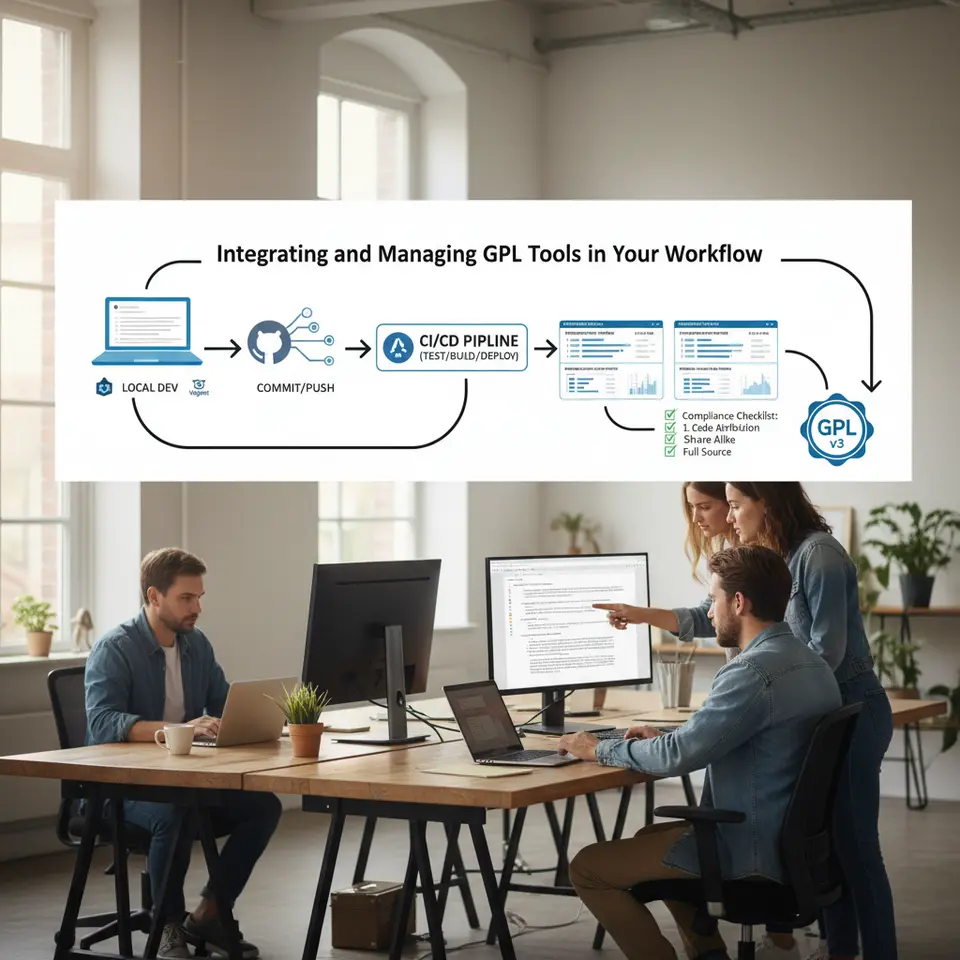
Implementing GPL tools effectively goes beyond installation; it demands a consistent, repeatable workflow that ensures quality and compliance. The following best practices can help teams of any size streamline their processes:
Establish a Local Development Environment
Set up local servers using Docker, Vagrant, or solutions like Local by Flywheel to mirror your production stack. Import GPL plugins and themes with Composer or WP-CLI to maintain version-controlled dependencies. This approach guarantees that every team member works with the same toolset, minimizing “works on my machine” issues and accelerating onboarding for new developers.
Leverage Version Control
Store all custom themes, plugin modifications, and configuration files in a Git repository. Tag releases and maintain clear commit messages to document changes over time. Branching strategies such as Git Flow can help you manage feature development, hotfixes, and releases in an organized manner, making rollbacks straightforward when necessary.
Automate Routine Tasks
Automate backups, database migrations, and code linting using shell scripts or continuous integration pipelines. Tools like GitHub Actions or Jenkins can trigger tests and deployments whenever changes are pushed. This reduces human error, ensures consistent execution, and frees up time for high-impact development activities.
Coordinate Dependency Management
Use Composer to manage PHP libraries and WP-CLI extensions, ensuring that your project can lock dependencies at specific versions. This prevents unexpected updates that might break compatibility. Document all package sources and version constraints in a composer.json file, enabling other team members to replicate the environment seamlessly.
Monitor and Optimize Performance
Integrate monitoring tools such as New Relic or open-source alternatives to track real-time metrics on server health and application performance. Schedule periodic audits with Query Monitor and other profiling utilities to detect regressions early. Proactive performance management ensures user satisfaction, reduces hosting costs, and supports scalable growth.
Maintain Licensing Compliance
Keep GPL license files and attribution notices alongside each tool in your repositories. When modifying GPL code, update copyright headers and distribution statements as required. Clear documentation of license compliance not only meets legal obligations but also demonstrates respect for the open-source community.
Foster Continuous Learning
Encourage team members to participate in community forums, contribute to GPL projects, and attend open-source conferences. This helps you stay current with emerging best practices and reinforces a culture of shared ownership. By engaging with the broader development community, you unlock deeper insights into optimizing your GPL toolchain.
By weaving these practices into your development workflow, GPL tools become more than just code; they form a predictable, scalable foundation for building high-quality WordPress sites. In the conclusion, we will summarize the key takeaways and next steps.
FAQ
What is a GPL tool in WordPress development?
GPL tools are plugins, themes, or utilities licensed under the GNU General Public License that grant you the freedom to run, study, share, and modify the software. These tools empower developers with full transparency and flexibility to tailor solutions to specific project needs.
How do GPL tools improve security?
Because the source code is publicly available, security researchers and community contributors can audit GPL tools, identify vulnerabilities, and release patches quickly. This community-driven approach often results in faster vulnerability disclosures and updates compared to proprietary software.
Can I modify GPL-licensed plugins for my projects?
Yes, the GPL grants the right to modify and redistribute code. You can adapt GPL-licensed plugins or themes to meet your requirements, provided you include the original license and make your modifications available under the same terms.
Conclusion
In today’s competitive online environment, efficiency, security, and adaptability are more crucial than ever. GPL tools provide a compelling pathway to achieve these goals by delivering open-source solutions that are transparent, flexible, and community-driven. From cost-saving benefits and deep customization options to robust security and vibrant support networks, these resources empower developers and site administrators to build, optimize, and maintain WordPress sites with confidence.
As you move forward, begin by evaluating your project’s requirements against the criteria outlined in this guide. Select a core set of GPL tools—from ACF and WP-CLI to Query Monitor and GitHub Updater—that align with your technical objectives and team capabilities. Establish a reliable development workflow incorporating local environments, version control, automated processes, and regular performance audits to maximize the potential of these tools.
Embracing GPL tools is not just a technical decision but a strategic move that fosters collaboration, innovation, and continual improvement. By integrating these open-source assets into your stack, you unlock opportunities for smarter development, faster delivery cycles, and sustainable growth. Ready to supercharge your WordPress projects? Leverage the power of GPL tools to accelerate your workflow, secure your site, and deliver exceptional experiences. The open-source community awaits your contributions, insights, and improvements—so join the movement and transform the way you build with WordPress.